2. Ubiquiti Unifi OS Blocks Upgrades on Unhealthy Disks
3. Enable no-subscription Proxmox updates
4. Selectively bypassing Docker cache in steps
5. Quick and dirty Linux directory size
The Microsoft Azure landscape is changing drastically and it's doing a good job of moving resource management to a more modern view. Coupled with Microsoft's security initiatives (Intune, Defender, Sentinel, Copilots for Security), Azure ARC is a great way of managing on-prem servers for updates.
Microsoft has a few ways of enrolling on-prem machines into ARC, but it's tedious to do this without bulk enrolment. Currently they support Config Manager, Group Policy or Ansible bulk enrolment. There is a Powershell option, but I guess it's meant as a starting point for devs as it doesn't actually do much. Let's fix it and have it remote install via Powershell to domain joined machines.
Follow the initial steps of creating the subscription, resource group and service principal. Grab the latest "Basic Script" ie Powershell (as the below might be out of date) and wrap it around some Invoke-Command. Replace the values in <> that come from your script that it generates for you.
# Read machine names from CSV file
$machineNames = Import-Csv -Path "arc_machines.csv" | Select-Object -ExpandProperty MachineName
$credential = (Get-Credential)

# Iterate through each machine
foreach ($machineName in $machineNames) {
    try {
        # Invoke-Command to run commands in an elevated context on the remote machine
        Write-Host "Attempting to install on $machineName"
        Invoke-Command -ComputerName $machineName -Credential $credential -ScriptBlock {
            # Code to execute on the remote machine
            $ServicePrincipalId="";
            $ServicePrincipalClientSecret="";

            $env:SUBSCRIPTION_ID = "";
            $env:RESOURCE_GROUP = "";
            $env:TENANT_ID = "";
            $env:LOCATION = "";
            $env:AUTH_TYPE = "principal";
            $env:CORRELATION_ID = "";
            $env:CLOUD = "AzureCloud";

            [Net.ServicePointManager]::SecurityProtocol = [Net.ServicePointManager]::SecurityProtocol -bor 3072;

            # Download the installation package
            Invoke-WebRequest -UseBasicParsing -Uri "https://aka.ms/azcmagent-windows" -TimeoutSec 30 -OutFile "$env:TEMP\install_windows_azcmagent.ps1";

            # Install the hybrid agent
            & "$env:TEMP\install_windows_azcmagent.ps1";
            if ($LASTEXITCODE -ne 0) { exit 1; }

            # Run connect command
            & "$env:ProgramW6432\AzureConnectedMachineAgent\azcmagent.exe" connect --service-principal-id "$ServicePrincipalId" --service-principal-secret "$ServicePrincipalClientSecret" --resource-group "$env:RESOURCE_GROUP" --tenant-id "$env:TENANT_ID" --location "$env:LOCATION" --subscription-id "$env:SUBSCRIPTION_ID" --cloud "$env:CLOUD" --correlation-id "$env:CORRELATION_ID";
        }
    }
    catch {
        Write-Host "Error occurred while connecting to $machineName : $_" -ForegroundColor Red
    }
}
Next create the file arc_machines.csv with one column called MachineName and each row being the DNS/NETBIOS name of the machine you want to remote into. The script will ask for your domain creds when starting which will be used to Invoke-Command into the remote host. It'll then use the Service Principal to enroll the machine into ARC.
Ubiquiti Unifi OS devices now restrict updates to its own platform when it thinks a disk is unhealthy. This is the most pointless and infuriating UX change the Ubiquiti has made (and they've made a few terrible changes in the past).
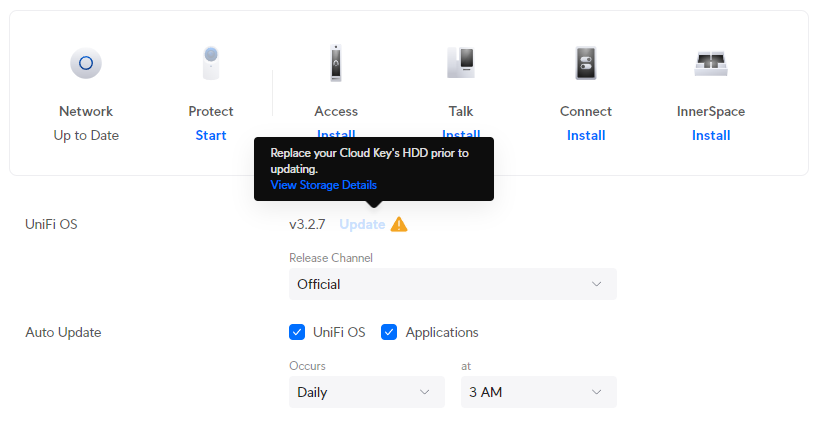
At-risk disks are flagged:
- Bad sectors being reported on the disk
- Uncorrectable disk errors detected
- Failures reported in the disk’s Self-Monitoring, Analysis and Reporting Technology system (SMART)
- The disk has reached 70% of the manufacturer’s recommended read and write lifespan (SSDs)
To not allow updates to their own platform stagnates feature development, bug fixes and security enhancements. Sure, make the admin aware that they have an at-risk disk, but don't prevent them from getting your latest updates, that's just purposefully punishing your customers over things that are not their fault.
In my case, my disk was old, but still healthy. I am not sure whether the power on hours were a flag from SMART or maybe the temperature went over some arbitrary threshold they decided to implement.
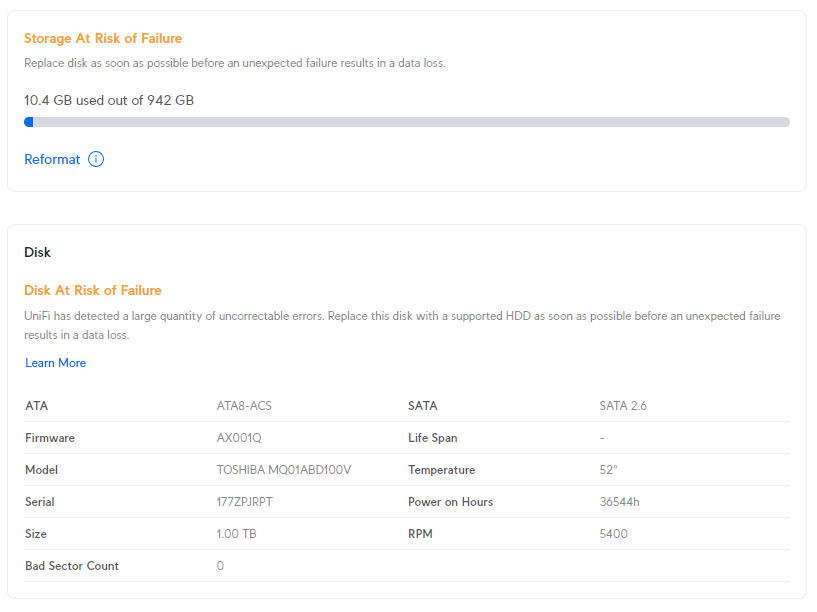
I was able to work around this by manually upgrading the platform.
- Enable SSH on the controller
- Use the ubnt-systool and associated FW links as documented here: https://help.ui.com/hc/en-us/articles/204910064-UniFi-Advanced-Updating-Techniques
- Reboot and enjoy
If you don't want to pay for a Proxmox subscription you can still get updates through the no-subscription channel.
cd /etc/apt/sources.list.d
cp pve-enterprise.list pve-no-subscription.list
nano pve-no-subscription.list
Edit the pve-no-subscription.list to the below
deb http://download.proxmox.com/debian/pve bookworm pve-no-subscriptionRun updates, but only use dist-upgrade and not regular upgrade as it may break dependencies.
apt-get update
apt-get dist-upgradeI have a project where I routinely build and rebuild containers between two repos, in which one of the docker build steps pulls the latest compiled code from the others repo. When doing this, the Docker cache gets in the way as it caches the published code.
For example:
- Project 1 publishes compiled code to blob storage
- Project 2 pulls the compiled code and publishes a built container
Project 2's Dockerfile will look something like:
FROM ubuntu:22.04
RUN wget https://blob.core.windows.net/version-1.zip
RUN unzip /var/www/version-1.zip -d /var/www/
The issue is if I update the content of version-1.zip, Docker will cache this content in its build process and be out of date.
I came across a great solution on stackoverflow: https://stackoverflow.com/questions/35134713/disable-cache-for-specific-run-commands
This solution doesn't work completely for me, as I am using docker-compose up commands, not docker-compose build. However, after a little trial and error, I have the below workflow working:
FROM ubuntu:22.04
ARG CACHEBUST=1
RUN wget https://blob.core.windows.net/version-1.zip
RUN unzip /var/www/version-1.zip -d /var/www/
Run a build:
docker compose -f "docker-compose.yml" build --build-arg CACHEBUST=someuniquekeyRun an up:
docker compose -f "docker-compose.yml" up -d --buildThis way the first run Docker build is cache busted using whatever unique key you want, and the second Docker up uses the newly compiled cache. NOTE: you can omit the last --build to not trigger a new cached build if you like. Now I can selectively bust out of the cache at a particular step, which in a long Dockerfile, can save heaps of time. I guess you could even put multiple args at strategic places along your Dockerfile and be able to trigger a bust where it makes most sense.
du -shc * | sort -rhWSL is fantastic for allowing devs and engineers to mix and match environments and toolsets. It's saved me many times having to maintain VM's specifically for different environments and versions of software. Microsoft are doing a pretty good job these days at updating it to support new features and bug fixes, however, running WSL and Docker as a permanent part of your workflow it's not without it's flaws.
This post will be added to as I remember optimizations that I have used in the past, however, all of them are specific to running Linux images and containers, not Windows.
Keep the WSL Kernel up to date
Make sure to keep the WSL Kernel up to date to take advantage of all the fixes Microsoft push.
wsl --update
Preventing Docker memory hog
I routinely work from a system with 16GB of RAM and running a few docker images would chew all available memory through the WSL vmmem process which would in turn lock my machine. The best workaround I could find for this was to set an upper limit for WSL memory consumption. You can do this through editing the .wslconfig file in your Users directory.
[wsl2]
memory=3GB   # Limits VM memory in WSL 2 up to 3GB
processors=2 # Makes the WSL 2 VM use two virtual processors
You will need to reboot WSL for this to take effect.
wsl --shutdownNOTE: half memory sizes don't seem to work, I tried 3.5GB and it just let it run max RAM on the system.
Slow filesystem access rates
When performing any sort of intensive file actions to files hosted in Windows but accessed through WSL you'll notice it's incredibly slow. There are a lot of open cases about this on the WSL GitHub repo, but the underlying issue is how the filesystem is "mounted" between the Windows and WSL.
This bug is incredibly frustrating when working with containers that host nginx or Apache as page load times are in the multiple seconds irrespective of local or server caching. The best way around this issue is not have filesystem served from Windows, but serve it inside of the WSL distro. This used to be incredibly finicky to achieve but is easy now given the integration of tooling to WSL.
For example, say you have a single container that serves web content through Apache and that your development workflow means you have to modify the web content and see changes in realtime (ie React, Vue, webpack etc). Instead of building the docker container with files sourced from a windows directory, move the files to the WSL Linux filesystem (clone your Repo in Linux if you're working on committed files), then from the Linux commandline issue your build. Through the WSL2/Docker integration, the Docker socket will let you build inside of Linux using the Linux filesystem but run the container natively on your Windows host.
To edit your files inside the container, you can run VS Code from your Linux commandline which through the Code/WSL integration will let you edit your Linux filesystem.
Mounting into Linux FS
Keep in mind that if you do need to mount from Windows into your Linux filesystem for whatever reason you can do it via a private share that is automatically exposed.
\\wsl$If you have multiple distros installed they will be in their own directory under that root.
Tuning the Docker vhdx
Optimize-VHD -Path $Env:LOCALAPPDATA\Docker\wsl\data\ext4.vhdx -Mode FullThis command didn't do much for me. It took about 10minutes to run and only reduced my vhdx from 71.4GB to 70.2GB.
Error not binding port
I've had this recurring error every so often when restarting Windows and running Docker with WSL2. Every so often Docker compains it can't bind to a port that I need (like MySQL). Hunting down the cause of this is interesting - https://github.com/docker/for-win/issues/3171 - https://github.com/microsoft/WSL/issues/5306
The quick fix to this is:
net stop winnat
net start winnat
Sometimes even in the most organised of worlds, we still manage to miss patching older systems. I found an old HP iLO server running iLO 4 - 1.20 with no way to log into it. Every modern browser and OS has now deprecated old TLS, RC4 and 3DES cyphers for certificates with the most common FF error being thrown: SSL_ERROR_NO_CYPHER_OVERLAP.
Irrespective of what I tried (such as security.tls.version.min, version.fallback-limit, IE compatibility modes) nothing would work. Even an old 2008 server running IE wouldn't work because of Javascript blocking etc. Unfortunately the only way I could work around this was to spin a Win7 machine running original IE to bust into it. Ideally I wouldn't have had to roll a new Win7 VM, but old versions for this reason should be in everyones toolbox.
Once in, it's easy enough to upgrade to a more modern iLO FW which supports modern TLS considering that HP make it readily available https://support.hpe.com/connect/s/softwaredetails?language=en_US&softwareId=MTX_729b6d22f37f4f229dfccbc3a9.
This is the computed list of SSH bruteforce IP’s and commonly used usernames for April 2013.
Top 50 SSH bruteforce offenders IP’s.
| Failed Attempt Count | IP |
| 479633 | 223.4.147.158 |
| 389495 | 198.15.109.24 |
| 354877 | 114.34.18.25 |
| 324632 | 118.98.96.81 |
| 277040 | 61.144.14.118 |
| 118890 | 92.103.184.178 |
| 113896 | 208.68.36.23 |
| 110541 | 61.19.69.45 |
| 102587 | 120.29.222.26 |
| 98027 | 216.6.91.170 |
| 87315 | 219.143.116.40 |
| 71213 | 200.26.134.122 |
| 68007 | 38.122.110.18 |
| 65463 | 133.50.136.67 |
| 65187 | 121.156.105.62 |
| 57918 | 210.51.10.62 |
| 55575 | 10.40.54.5 |
| 52888 | 110.234.180.88 |
| 51473 | 61.28.196.62 |
| 46058 | 223.4.211.22 |
| 45495 | 183.136.159.163 |
| 45363 | 61.28.196.190 |
| 41791 | 1.55.242.92 |
| 40654 | 223.4.233.77 |
| 39423 | 61.155.62.178 |
| 39360 | 61.28.193.1 |
| 39296 | 211.90.87.22 |
| 38516 | 119.97.180.135 |
| 35799 | 221.122.98.22 |
| 35077 | 109.87.208.17 |
| 31106 | 78.129.222.102 |
| 29505 | 74.63.254.79 |
| 28676 | 65.111.174.19 |
| 28623 | 116.229.239.189 |
| 28092 | 81.25.28.146 |
| 26782 | 223.4.148.150 |
| 26493 | 218.69.248.24 |
| 25853 | 210.149.189.6 |
| 25241 | 223.4.27.22 |
| 25231 | 221.204.252.149 |
| 25089 | 125.69.90.148 |
| 23951 | 69.167.161.58 |
| 22912 | 202.108.62.199 |
| 22433 | 61.147.79.98 |
| 22372 | 111.42.0.25 |
| 22068 | 218.104.48.105 |
| 21988 | 120.138.27.197 |
| 21914 | 14.63.213.49 |
| 21882 | 60.220.225.21 |
| 20780 | 195.98.38.52 |
Top 50 SSH bruteforce usernames.
| Failed Attempt Count | Username |
| 2407233 | root |
| 45971 | oracle |
| 40375 | test |
| 26522 | admin |
| 22642 | bin |
| 20586 | user |
| 18782 | nagios |
| 17370 | guest |
| 13292 | postgres |
| 11193 | www |
| 11088 | mysql |
| 10281 | a |
| 10228 | webroot |
| 10061 | web |
| 9143 | testuser |
| 8946 | tester |
| 8708 | apache |
| 8611 | ftpuser |
| 8442 | testing |
| 8095 | webmaster |
| 7379 | info |
| 7112 | tomcat |
| 6826 | webadmin |
| 6309 | student |
| 6255 | ftp |
| 6254 | ts |
| 5947 | backup |
| 5688 | svn |
| 5314 | test1 |
| 5127 | support |
| 4743 | temp |
| 4378 | teamspeak |
| 4335 | toor |
| 4149 | test2 |
| 4046 | www-data |
| 3944 | git |
| 3907 | webuser |
| 3852 | userftp |
| 3637 | news |
| 3626 | cron |
| 3594 | alex |
| 3581 | amanda |
| 3535 | ts3 |
| 3397 | ftptest |
| 3378 | students |
| 3360 | test3 |
| 3283 | |
| 3243 | games |
| 3132 | test123 |
| 3093 | test4 |
I maintain a radius server that proxies requests from publicly accessible SSH servers which, unfortunately must run on port 22.
There are over 140 SSH servers that proxy all requests through this server and due to the logging which is configured I am able to capture all failed attempts including username password and IP address. I frequently scan these logs to find the top offending IP addresses and common usernames so I can add them to a blacklist for the radius server to drop straight away.
There are many public projects that compile sources of such information, however these logs are easy for me to divulge for others to incorporate into similar lists.
I will throw some old stats of interest and work on this to become a monthly release.
October 2012
Failed Attacks: 19,969,074
November 2012
Failed Attacks: 11,335,220
December 2012
Failed Attacks: 5,277,817 <- I guess everyone went quite over the holiday period?
January 2013
Failed Attacks: 6,786,138
February 2013
Failed Attacks: 17,375,929
March 2013
Failed Attacks: 16,437,020
April 2013
Failed Attacks: 5,542,223
May 2013
Failed Attacks To Date: 3,347,659
As mentioned, I can confirm that Cisco Call Manager 9 (CCM9 ) does work in VirtualBox and can be installed in a similar manner to CCM7. I have had both 9.0.1 and 9.1.1 have been installed with all services running perfectly.
As we did with CCM7, CCM9 must first be installed in VMware and then moved over to VirtualBox. CCM9 is now 100% supported in VMware, so the install process should be flawless. Keep in mind though that VirtualBox is definitely not officially supported, so you will get no help from TAC. This should only be used in a lab environment.
The minimum requirements for CCM9 are the same as they were in CCM7, 1x 80GB SCSI disk with 2048MB RAM. The CUC prerequisites have changed slightly and if you use 80GB/2048MB you won’t be able to install CUC. I haven’t been bothered to find the minimum requirements for CUC but I’ll post them up when I get some time.
I’ve used VMware Workstation 8.0, but you should be able to use any version of VMware to build the initial machine. All we need to do is to have the install complete and boot successfully, all other finer details can be changed once we move over to VirtualBox.
- Start by creating a new VM and choose a custom config.
- Depending on your version of VMware this may change, but I used Workstation 8.0 as the hardware platform.
- We don’t want to use the auto deployment scripts and we will need to modify the hardware before boot, so just choose the ISO later.
- Any version of Red Hat should work here, but I used 64-bit version of Enterprise 6.
- Name it appropriately.
- One processor is enough but if you’ve got more resources to throw at it, you may be able to do it here as long as you match the same in VirtualBox later.
- Same goes for the RAM. The minimum requirements call for 2048MB but if you’ve got more, chuck it in.
- I hate using NAT, but it’s probably useful for labs. In any case I’ve got bridged here, but we will redo this step later in the VBox config.
- Make sure you use SCSI here. I haven’t tried SAS but it may work too.
- Create a new HDD.
- Make sure this is set to SCSI, it won’t work with IDE here.
- I’ve got the minimum as 80GB here, but if you’ve got more throw it here.
- This is where the vmdk is stored, make sure you take note of the location as we will need this file later to import into VBox.
- Finish it up.
- Edit your VM before powering it on, we’ve got a few things to do here.
- Select the CD/DVD drive and browse for your ISO.
- Select your ISO.
- I’ve finished up here, but if you want you can remove the floppy, sound cards etc.
- Power on the VMWare image.
- The install process here is exactly the same as a typical CCM9 install, I’ve included it just for the sake of doing so.
- Notice here that CUC isn’t available because our hardware config is too low speccd.
- This will take quite a while.
- Once the installation has finished, log in and shut it down.
- Now it’s time to fire up VirtualBox.
- Add a new Red Hat 64-bit guest.
- Make sure your memory size is the same as what you built in VMware.
- We need to not add a new hard drive here (we will be reusing the one built by VMware).
- Just accept this.
- We need to edit our VM before powering it on.
- Remove the SATA controller, if you remember we built the VM in VMware using SCSI disks.
- Add a SCSI controller.
- Select Choose Existing Disk.
- Browse to the vmdk file that was outputted by VMware.
- Your disk setup should now look like this.
- Choose the IDE CDROM drive to boot from the CentOS live boot disk. Note that you can boot of any live distro, I actually used the Ubuntu 12.04 live CD because I was having issues with remote key forwarding to the VM whilst using CentOS.
- Again, I hate NAT’ed NIC’s so I switched mine to bridged.
- Mount your CCM partition and chroot to it.
- vi/nano/whatever the hardware_check.sh script in /usr/local/bin/base_scripts/ which is similar to what we did in CCM7.
- Find the function check_deployment() as shown below.
- Like we did for CCM7 edit out the isDeploymentValidForHardware function.
- Make sure you save the file, I used vi to edit this so :wq! it.
- Throw the following lines in to change the hardware type to match those by VMware.
vboxmanage setextradata “<VM name>” “VBoxInternal/Devices/pcbios/0/Config/DmiBIOSVersion” “6 ”
vboxmanage setextradata “<VM name>” “VBoxInternal/Devices/pcbios/0/Config/DmiSystemVendor” “VMware”
vboxmanage setextradata “<VM name>” “VBoxInternal/Devices/pcbios/0/Config/DmiBIOSVendor” “Phoenix Technologies LTD”
vboxmanage setextradata “<VM name>” “VBoxInternal/Devices/pcbios/0/Config/DmiSystemProduct” “VMware Virtual Platform” - Now you’re ready to fire up CCM9 in VirtualBox so just run that thang.
- On bootup you should be able to see the OS detecting all your hardware as VMware devices – this is a good thing, don’t worry
- If you receive some weird output, don’t worry too much, the important thing is that the OS boots and services start successfully.
- Again, ignore any of these types of errors, this is why this shouldn’t be used in production.
- Login, hooray!
- Because the hardware has been modified slightly, the OS is unable to detect the vCPU and the amount of RAM.

- However, everything still works perfectly 😉
Just a few notes about the install. In the CCM7 install I did before, I added a new user whilst chroot’ed over to the CCM partition so we could SSH in later to modify the check_deployment() script. I only attempted a few times, but every time I tried my SSH user couldn’t log in. All permissions were set correctly, the user was added to the OS properly but SSH wouldn’t work. I’m sure if I dug deeper I would probably find some sort of SSH permission script in Cisco’s funky land, but for the purposes of getting CCM9 into VirtualBox it wasn’t needed.
I’ll be posting some more info on the topic as I use this more. Also, due to CCM9’s new licensing model I *may* look at loading licenses on to get this running past the 60 day limitation.
Good luck
x90